

Home
cBioPortal Production
-
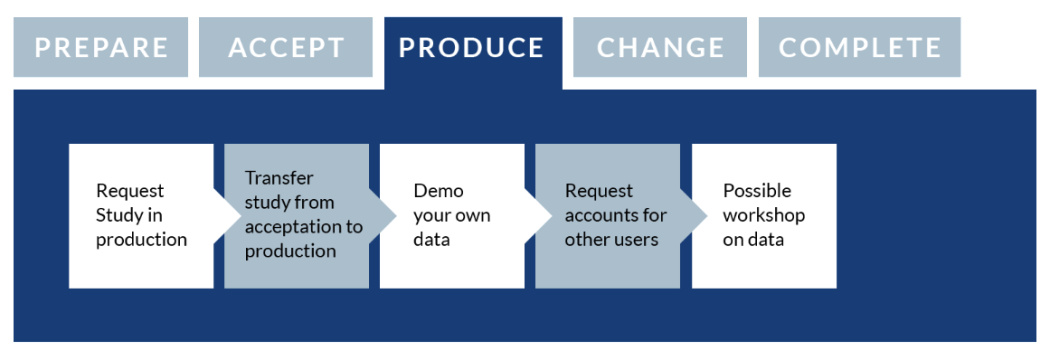
Request study in production
After the study has been modelled in the acceptation environment and you are content with the representation in cBioPortal, the next step is to move the study to the production server. The production server is a stable environment where versions of the data are loaded to use in your research.
To move your study from the acceptation to the production server, a formal request must be made to the data team. The request is made by logging into the Health-RI Self-Service Portal, selecting ‘Services and Request Forms’, going to 'cBioPortal' and entering ‘cBioPortal new study request’. This time, in the form, the request can be made to load your data to the production environment of cBioPortal.
-
Transfer study from acceptation to production
After the data team receives the request to load the current version from acceptation to production, the data will be loaded to the production server. After the data loading, the data loader checks whether the data was loaded correctly. When the study is available in production, access will be given to the PI/delegate and a notification will be sent.
-
Done
You can now make use of your study in cBioPortal. Access for other users can be requested through the Health-RI Self-Service Portal. In case you as the data owner, or other users would like to do a quick 30-minutes tutorial on cBioPortal, in which you will learn all the basics, then you can download the training handout material that is available upon request.
-
Demo you own data (optional)
Next, you are free to demo your data in cBioPortal to your peers. If needed, a member of the data team can be present at the demo in order to provide further explanation or clarification if necessary.
-
Changes in study
It is always possible that data updates become available over time or errors in the provided input data are spotted and adjustments are needed.
In order to make changes or adjustments to an existing study in cBioPortal, a request can be made by logging into the Health-RI Self-Service Portal. Select ‘Services and Request Forms’ and go to ‘cBioPortal' in order to fill in a ‘cBioPortal update existing study’ form. In the remarks please indicate that the study needs adjustments. The data team will get in touch after receiving the request.