

Home
cBioPortal Preparation
-
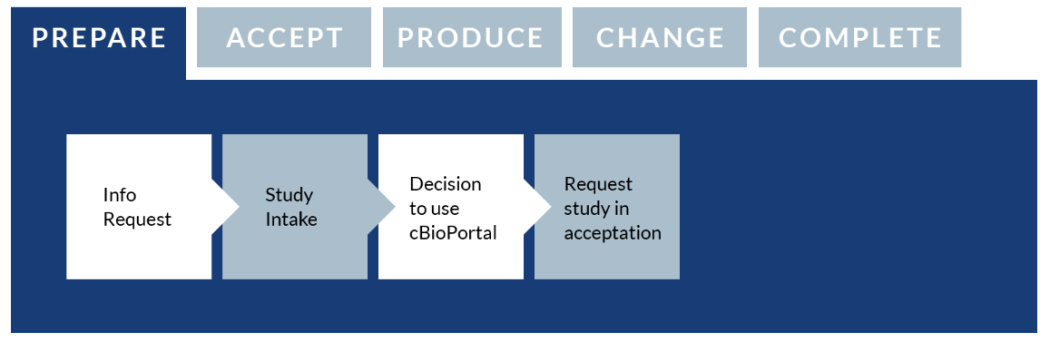
Information request
If you want to know more about whether and how you can use cBioPortal for your research data, please contact the Health-RI Servicedesk.
If you do not yet have an account for the Health-RI self-service portal, an account will be created for you, and your information request will be processed accordingly. You will be contacted by a member of the cBioPortal data team, who will gladly answer any questions you may have.
You can view demonstration studies in cBioPortal by visiting https://www.cbioportal.org/. For a more in-depth impression of cBioPortal, its application and uses, a live demo can be given upon request.
-
Study intake
Following the information request step, a member of the cBioPortal data team will discuss with you if, and in which manner, your data types can be imported and modeled in the cBioPortal data-integration platform in order to view, query and analyze the available data.
It will also be established which types of queries and analyses can be performed within this data-integration platform, and which may need to be performed in another environment (more specialized queries). During this talk it will be discussed with you which steps need to be performed by you as a data owner, and which steps will be performed by the data team.
In the ‘data preparation’ step, you can already read about how you should prepare the data and what the requirements are.
-
Decision to use cBioPortal
Following the information request and study intake, you are free to decide whether to make use of cBioPortal. If you do decide to use cBioPortal, you can request for a new study to be made in the ‘acceptation environment’ of cBioPortal, as described in the next step.
-
Request study in acceptation
Once you have decided that you would like to make use of cBioPortal for your data, you can login to the Health-RI Self-Service Portal, select ‘Services and Request Forms’ and go to 'cBioPortal' and then enter ‘cBioPortal new study request’.